
Coders often underestimate the role of display connectivity. Yet, long hours of coding demand crisp text, stable refresh rates, and zero signal drop. While DisplayPort is popular, HDMI—especially newer versions—has quietly become a powerful option for developers.
Why Resolution Matters for Coders
Higher resolution means:
- More code visible on screen
- Reduced scrolling
- Less eye strain
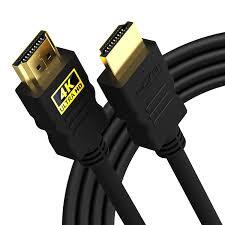
HDMI 2.0 and above comfortably support 4K at 60Hz, which is ideal for coding environments.
HDMI Advantages for Coding Setups
Universal Compatibility
HDMI works seamlessly with:
- Laptops
- External monitors
- Docking stations
This is especially useful for developers switching between office and home setups.
Stable Signal for Long Hours
Quality HDMI cables maintain consistent signal output without flickering—crucial during extended coding sessions.
Multi‑Monitor Support
Modern HDMI splitters and GPUs allow:
- Dual or triple monitor setups
- Clean text rendering across screens
HDMI Cable Specs Coders Should Look For
- Gold‑plated connectors for durability
- EMI shielding to reduce signal noise
- Support for 4K or higher resolutions
HDMI vs DisplayPort: The Practical Truth
While DisplayPort may offer higher refresh rates on paper, HDMI wins in:
- Ease of use
- Availability
- Compatibility across devices
For most coders, HDMI provides everything needed without extra adapters.